 |
AJA NTV2 SDK
18.1.0.2439
NTV2 SDK 18.1.0.2439
|
|
AJA NTV2 SDK
18.1.0.2439
NTV2 SDK 18.1.0.2439
|
The NTV2 Software Development Kit (SDK) is a suite of classes and data types which allow end-users to access and control nearly any NTV2-compatible AJA device using the C++ programming language.
AJA hardware products play back or ingest video, plus ancillary data (e.g., audio, timecode, captions, etc.) to or from a host computer. The purpose of the SDK is to enable third-party developers to easily access and/or control the video, audio or ancillary data entering or leaving the device. The SDK has two major parts – a low-level device driver, and a user-space library.
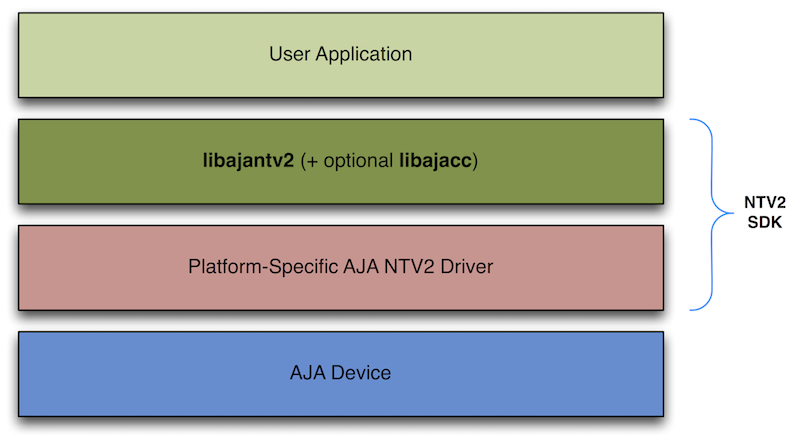
The device driver runs at the kernel level and handles low-level communication with the device. It is a required component of the SDK and provides the user-space library with the means to communicate and control the device.
The “libajantv2” Class Library (libajantv2.lib on Windows, or libajantv2.a on Linux and MacOS) is the principal user-space library that an application must link with in order to access and control AJA devices. It implements a suite of C++ classes which an application can instantiate and use to perform various operations on an AJA device. This library contains many functions that are useful for interrogating and controlling AJA devices.
Most NTV2 object class instances can be created in the usual ways – using operator new, creating it directly on the stack, or by aggregation (incorporating the NTV2 object as a member variable in your own class). For destruction, the usual rules apply. NTV2 objects that were created on the stack will automatically destruct when they go out of scope. Instances that were created via aggregation will destruct when the owning object’s destructor is called. Instances that were explicitly created using operator new must be explicitly destroyed using operator delete.
As a general rule, AJA recommends never deriving your application’s classes from any NTV2 classes.
This is a handy collection of platform-independent classes and templates that provide several practical, basic services including…
Prior to SDK 15.0, these “base” classes were compiled into their own libajabase library. Starting with SDK 15.0, they were merged into the libajantv2 library.
Starting in SDK 16.0, the default platform-specific implementations of AJALock and AJAAutoLock are provided by the C++11 compiler. See gs-sdkbuild for details.
This library contains the principal classes and data types that interface with the NTV2 device driver, plus a number of utility classes that deal with NTV2-specific data formats.
Most NTV2 functions and class methods return a bool value of true for “success” and false for “failure”. NTV2 functions and classes do not intentionally or explicitly throw exceptions. Under unusual and extreme conditions (e.g. memory exhaustion), it's possible for an exception to be thrown (e.g. std::bad_alloc).
The CNTV2DeviceScanner class is used to enumerate or find available devices.
The CNTV2Card class is used to interrogate and control an NTV2 device.
CNTV2Card has a very large number of instance methods that inquire about and/or control different aspects of the hardware, which can be organized into several API groups. Here are some examples (this list is not comprehensive):
Device feature inquiries should be directed to the device itself through the DeviceCapabilities class via CNTV2Card::features. The same information can be obtained through the low-level functions CNTV2DriverInterface::IsSupported, CNTV2DriverInterface::GetNumSupported and CNTV2DriverInterface::GetSupportedItems. See Device Features for more information.
Example: Determine if a device is Thunderbolt-connected, and if it supports the NTV2_FBF_10BIT_RGB buffer pixel format:
Example: Determine if a device has an SDI2 connector, and if it’s bi-directional:
The legacy “NTV2Device…” functions require an NTV2DeviceID parameter that identifies the AJA device model. Starting in SDK 17.1, this ancient API is slowly starting to be phased out, due to the necessity of supporting plugins and other types of devices, including virtual ones, that cannot always have an NTV2DeviceID. These functions may be deprecated in a future SDK, and should be avoided going forward. See Determining Firmware Features for more information.
The Ancillary Data Classes allow client software to easily encode/decode SDI Ancillary Data or HDMI Auxiliary Data to/from host buffers in a manner that’s compatible with how NTV2 devices transmit/receive ancillary data. See SDI Ancillary Data or HDMI Auxiliary Data for more information.
In SDK 14.x and earlier, these classes were in their own libajaanc library, but starting with SDK 15.0, they were merged into the “libajantv2” Class Library to support the (new at the time) KONA IP and Io IP devices.
The Closed-Caption C++ classes allow NTV2 clients to easily encode or decode CEA-608 or CEA-708 closed-caption data using NTV2 devices. The code operates identically on Windows, MacOS and Linux.
In SDK version 18.0 and earlier, these classes were closed-source and supplied pre-built in their own static libajacc library.
Starting in SDK 18.1, they became open-source, and included in the libajantv2 source tree. The CMake parameter AJANTV2_DISABLE_AJACC controls whether or not they’re built with the rest of the SDK. It defaults to ON (excluded). To include the “ajacc” classes, set AJANTV2_DISABLE_AJACC to OFF and rebuild.
Caption library class instances are provided using type-safe “smart” pointers (see AJARefPtr), which helps to simplify memory management, and eliminate leaks and double-free’s. Client programs need not micromanage the lifespans of these objects.
Client programs instantiate library objects using a Create class method, which always return a valid smart pointer if the function result is true, an invalid one if the result is false (i.e. std::bad_alloc should never be thrown).
The CNTV2CaptionDecoder608 class is a full-featured CEA-608 caption decoder that can decode message or control bytes found in line 21 of an SD frame buffer, parse it to the appropriate channel (CC1, CC2, etc.), where the current state and buffer status is maintained. The class handles parsing for captioning channels CC1-CC4, TX1-TX4, and XDS in parallel — i.e., it decodes them all simultaneously.
For display purposes, the class provides CNTV2CaptionDecoder608::SetDisplayChannel to select the current displayed channel of interest. However, since all channels are decoded simultaneously in parallel, the decoder’s “display” channel can be changed at any time, with the state of the newly-selected channel immediately seen without having to wait for the channel to receive enough new data to get back in-sync.
To implement a basic decoder, create an instance (using the CNTV2CaptionDecoder608::Create method), then call CNTV2CaptionDecoder608::SetDisplayChannel to select the current displayed channel of interest (if any). Clients should then call CNTV2CaptionDecoder608::ProcessNew608FrameData with the four bytes of CEA-608 CaptionData that arrive every frame. If interlaced video is being decoded, 2 bytes of data are often arriving with each field. The best thing to do is wait until the end of the frame and package both fields’ data into the one call.
CNTV2CaptionDecoder608::ProcessNew608FrameData should be called every frame, even if the captioning data for that frame is all zeroes. CEA-608 caption rules call for certain commands to be sent twice on adjacent frames. This means that there is a difference between command|command and command|NULL|command, and if the decoder never sees the intervening NULL frames, it may mistakenly think two commands came from adjacent frames and misinterpret them.
To display the caption data, call CNTV2CaptionDecoder608::SetDisplayChannel to select which captioning channel to display, then call CNTV2CaptionDecoder608::BurnCaptions with a pointer to the frame buffer holding the video. Clients may also iteratively call CNTV2CaptionDecoder608::GetOnAirCharacter to get the character at each “cell” of the frame buffer, and implement your own burn-in. When using the burn-in feature, CNTV2CaptionDecoder608::IdleFrame should be called once per frame to properly cause characters having the “blink” display attribute to flash.
The decoder also has a simple notification callback mechanism that notifies a client program of caption changes in the channel of interest. Call CNTV2CaptionDecoder608::SubscribeChangeNotification to install the client callback, and CNTV2CaptionDecoder608::UnsubscribeChangeNotification to remove it. As changes to the caption channel occur — e.g., the character to be displayed at a given row/column, or its attributes (color, italics, etc.) — the client callback function is called. This permits an event-driven caption display model, as opposed to a polled model. (Note that this mechanism cannot “blink” characters that have the “flash” display attribute.)
The CNTV2CaptionEncoder608 class is used to encode CEA-608 compliant caption messages into a valid “Line 21” waveform for copying into an SD frame buffer. It supports the three principal caption types — “pop-on”, “paint-on”, and “roll-up” — with optional character display attributes (color, italics, etc.).
Call CNTV2CaptionEncoder608::Create to instantiate a new instance.
There are three instance methods for enqueueing messages for each display method:
There are three instance methods for dequeueing messages, from lowest (least abstract) to highest (most abstract) level:
There are two methods for reporting the queue status:
Finally, there are five methods for reporting usage statistics — i.e., querying the total bytes or messages ever enqueued or dequeued, plus querying the highest queue depth.
The queues used in this class are thread-safe, so it’s okay to use one thread to enqueue messages, and another thread to dequeue them and encode them into your host frame buffer.
The CNTV2Line21Captioner class is used to encode or decode EIA-608 compliant raw data bytes to/from line 21 of an SD frame buffer.
The CNTV2Line21Captioner::DecodeLine (static) class method decodes line 21 into raw caption bytes.
The CNTV2Line21Captioner::EncodeLine instance method encodes raw caption bytes into a line 21 waveform.
The CNTV2CaptionDecoder708 class is a CEA-708 caption decoder that can decode “service level 1” caption data found in SMPTE-334-compliant ancillary data packets. This is useful for extracting CEA-608 caption bytes from an HD video stream.
There are two ways to feed a decoder instance the requisite ancillary data it needs to decode captions:
Once the decoder has the ancillary data, call its CNTV2CaptionDecoder708::ParseSMPTE334AncPacket method to have it parsed.
To obtain any embedded 608-style captions it was able to decode, call its CNTV2CaptionDecoder708::GetCC608CaptionData method, then pass them into the CNTV2CaptionDecoder608 instance’s CNTV2CaptionDecoder608::ProcessNew608FrameData function.
The CNTV2CaptionEncoder708 class is a CEA-708 caption encoder that encodes caption data into SMPTE-334-compliant ancillary data packets.
There are two principal sets of methods:
To output SMPTE-334 ancillary data into a host frame buffer for eventual transfer to an AJA device, call CNTV2CaptionEncoder708::InsertSMPTE334AncPacketInVideoFrame.
The CNTV2CaptionRenderer class renders CEA-608-compliant characters and/or strings into NTV2 frame buffers. It currently only supports the following frame buffer formats:
It’s easiest to use its class methods, which automatically take care of creating, opening and initializing the specific renderer instance for a given frame buffer format and frame geometry.
If more control is needed over when (and which) renderer instances get allocated or freed, use these class methods:
Many functions in the NTV2 SDK log messages to the AJADebug logging facility. Sometimes a message is logged when something goes wrong; other times a message is logged when something worked properly.
When there are problems with the hardware or the SDK, it can be very helpful to monitor or record this logging activity to aid in the problem’s diagnosis.
AJADebug utilizes a fixed-size shared memory region that implements a ring-buffer into which new log messages are written from the SDK by any number of client applications, while other applications or tools read messages from the buffer for display or analysis.
Messages are added to the log with this additional metadata:
AJA currently provides three applications to monitor messages being logged by SDK client applications:
IMPORTANT for OEM Developers:
For messages to enter the shared ring buffer from your SDK client application, you must first call AJADebug::Open. If this is not done, none of the above log readers/viewers will see any messages logged from your application.
 1.8.14